Two Main Methods to Handle Data-Heavy Interfaces
This article uses React.js for the explanation and examples, but the concepts are the same for all frontend libraries. I recommend focusing on the underlying architecture, instead of coding practices.
For frontend applications it's common to control and present heavy data. For example, a table with 50 rows is easy to render and show. If data grows to 50,000 rows, the solution we used before might fail. There are many reasons behind it:
- Too many DOM nodes: 50,000 rows with 10 cells mean 500,000 DOM elements. It immediately slows layout, style recalculation and scrolling.
- Too much memory: Every row object, component instance and event listener stays alive in the browser tab. If we have 1 component per row and 3 actions, it means there are 50,000 component instances and 150,000 event listeners for a table.
- Too much network: Fetching the whole dataset up front delays the first useful screen by seconds.
These 3 issues can be solved with one of these solutions, depending on business requirements and needs.
- Virtualization: Rendering only the rows currently on the screen.
- Pagination: Method to split data into pages.
Virtualization
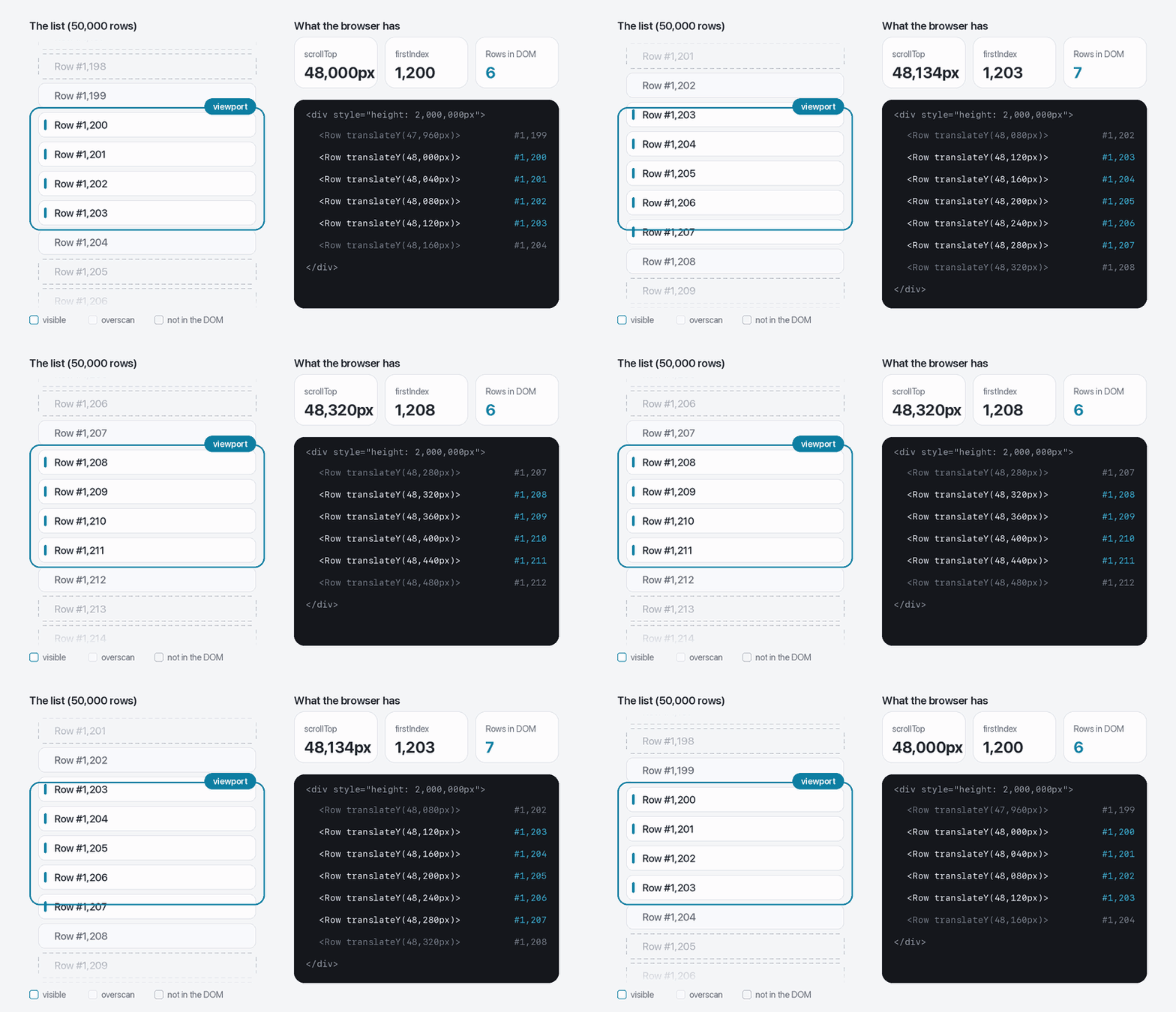
Virtualization is also called windowing. It's a concept to keep one long, continuously scrollable list but only render the rows inside the viewport, plus a small buffer above and below. Users can scroll through 50,000 rows but the DOM still holds only 30 of them.
How it works in practice
- Container of elements with a scroll gets the full height the list would have. For example, if one row is 48px, for 50,000 rows it means 50,000 * 48 = 2.4 million px.
- On every scroll, the code reads
scrollTopand works out which rows are visible.firstIndex = Math.floor(scrollTop / rowHeight). For example, if scrollTop is 320px, firstIndex will be 6. - The code renders just those rows, absolutely positioned to where they belong.
- Rows that leave the window are unmounted or recycled for the next ones coming in.
The user always sees a normal scrollbar and a list that seems complete. Under the hood, we play a game with the user: showing only the rows visible in the viewport.
How to do it
We rarely need to write this ourselves. There are already well-known libraries, such as @tanstack/react-virtual or react-window. Virtualization can be built from scratch, but generally apps prefer these libraries because they are battle tested. These solutions are open source, and thousands of apps have already found the bugs: handling rows of different heights, scroll anchoring, row flickering, and stale rows when items are reordered.
For example, with TanStack Virtual:
import { useRef } from "react";
import { useVirtualizer } from "@tanstack/react-virtual";

function ProductList({ products }: { products: Product[] }) {
  const parentRef = useRef<HTMLDivElement>(null);

  const virtualizer = useVirtualizer({
    count: products.length,
    getScrollElement: () => parentRef.current,
    estimateSize: () => 48,
    overscan: 5,
  });

  return (
    <div ref={parentRef} style={{ height: 600, overflow: "auto" }}>
      <div style={{ height: virtualizer.getTotalSize(), position: "relative" }}>
        {virtualizer.getVirtualItems().map((row) => (
          <div
            key={row.key}
            style={{
              position: "absolute",
              top: 0,
              width: "100%",
              height: row.size,
              transform: `translateY(${row.start}px)`,
            }}
          >
            {products[row.index].name}
          </div>
        ))}
      </div>
    </div>
  );
}
It's the same 4 steps from above. getTotalSize() gives the full height of the list (step 1), getVirtualItems() returns only the visible rows (step 2), and each row is positioned with translateY (step 3). overscan: 5 is the small buffer: 5 extra rows above and below, so the user doesn't see empty space during fast scrolling.
Downsides
Virtualization is not free. Since the rows outside of the viewport don't exist in the DOM:
- Browser search doesn't work.
Ctrl + Fcan't find a row that is not rendered. - Accessibility gets harder. Screen readers don't know the list has 50,000 rows, unless we tell them with
aria-rowcountandaria-rowindex. - Network is still heavy. Virtualization solves DOM and memory issues of components, but the data itself still needs to be loaded. If the API returns 50,000 rows at once, the user waits for it.
Pagination
Pagination is another method to handle heavy data. Instead of showing all items on the same page, pagination is focused on splitting data into pages. Size of each page generally can be customized (10-25-50-100) and to see the next set of data the user moves to the next page. The most correct way of pagination requires changing the API contract, introducing query parameters and updating backend code. That's why there are 2 methods generally used.
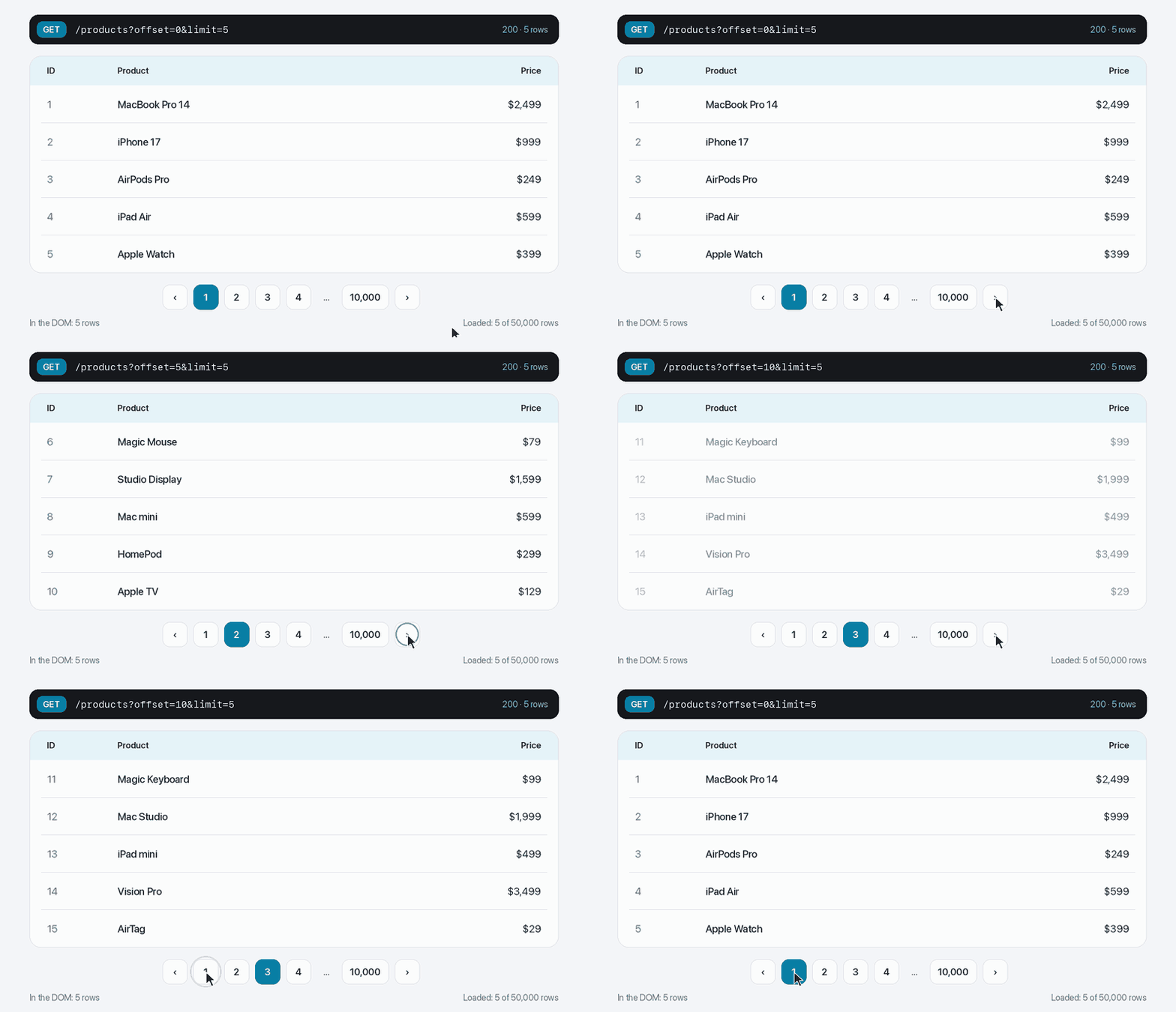
- Server-side pagination: Traditional way, where each API endpoint is updated with page/offset and limit parameters. After backend implements this, frontend app shows pages, and makes correct API calls to show the data.
- Client-side pagination: When API contract is limited and backend endpoints can't be updated, frontend application can load the full dataset once and implement pagination on the frontend side. The method is simple: the data is sliced in the frontend app, and only the chosen part is shown to the user.
Keep in mind that client-side pagination only solves the DOM issue. The full dataset is still downloaded and kept in memory. It's a good solution for a few thousand rows, but not for 50,000. Also search, sorting and filtering should work on the same side as pagination. If the data is paginated on the server, but sorted on the client, the user only sorts the current page, not the whole data.
Server-side pagination can use 2 logics under the hood: offset and cursor.
Offset pagination
Offset pagination is the classic one. The client says how many rows to skip, and how many rows to return:
GET /products?offset=40&limit=20
On the backend it usually becomes a simple SQL query:
SELECT * FROM products ORDER BY id LIMIT 20 OFFSET 40;Page number is easy to calculate: offset = (page - 1) * limit. That's why offset pagination is great for tables with page numbers. The user can jump directly from page 1 to page 57, and we can show "Page 3 of 2,500".
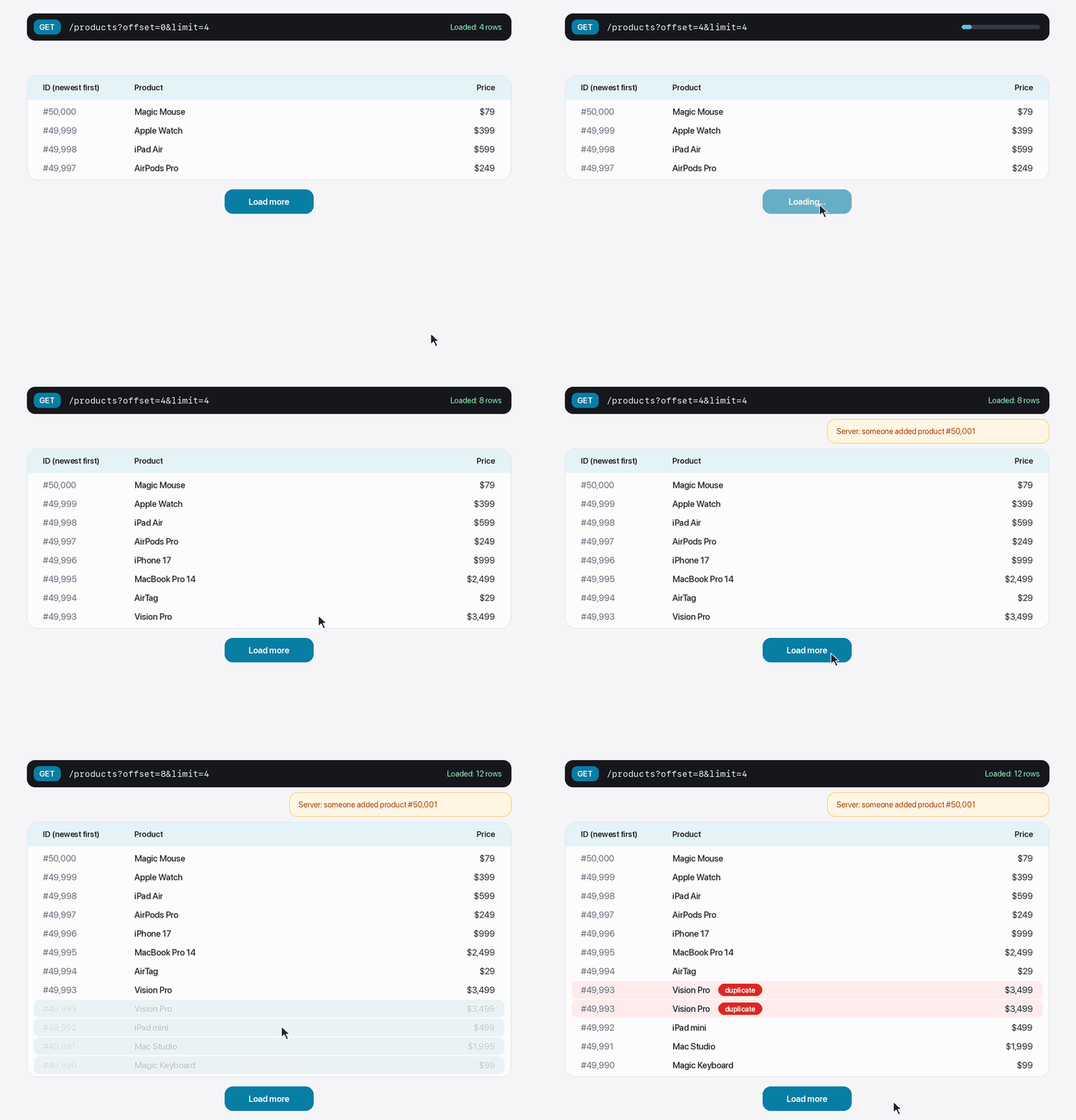
Offset is not only for page numbers. Imagine the products list has a Load more button at the bottom. Instead of replacing the rows, each click appends the next rows to the end of the list. Here the offset is simply the number of rows we already loaded:
But it has 2 problems:
- It gets slower on deep pages. For
OFFSET 40000, the database still reads 40,000 rows, and then throws them away. Page 1 is fast, page 2,000 is slow. - Data shifts between pages. Imagine the list is sorted by newest first, the user is on page 2, and somebody adds a new product. Every row moves one position down, so the last row of page 2 becomes the first row of page 3. The user sees the same product twice. If a product is deleted, the opposite happens, and the user skips one row without noticing.
With a Load more button, the second problem is even more visible. Pages are not replaced, they are added to the same list. So if the list is sorted by newest first and a new product is added between 2 clicks, the duplicated product appears twice on the screen, one under the other, and React warns about 2 children with the same key. This is one of the reasons why infinite lists usually use cursor pagination.
Cursor pagination
Cursor pagination doesn't skip rows. Instead, the client says "give me the rows after this one". The server returns the data with a cursor, which points to the last row of the current page:
GET /products?limit=20&after=eyJpZCI6NDB9
{
  "items": [...],
  "nextCursor": "eyJpZCI6NjB9"
}
The cursor is usually an encoded value of the last row, for example the id. On the backend it becomes:
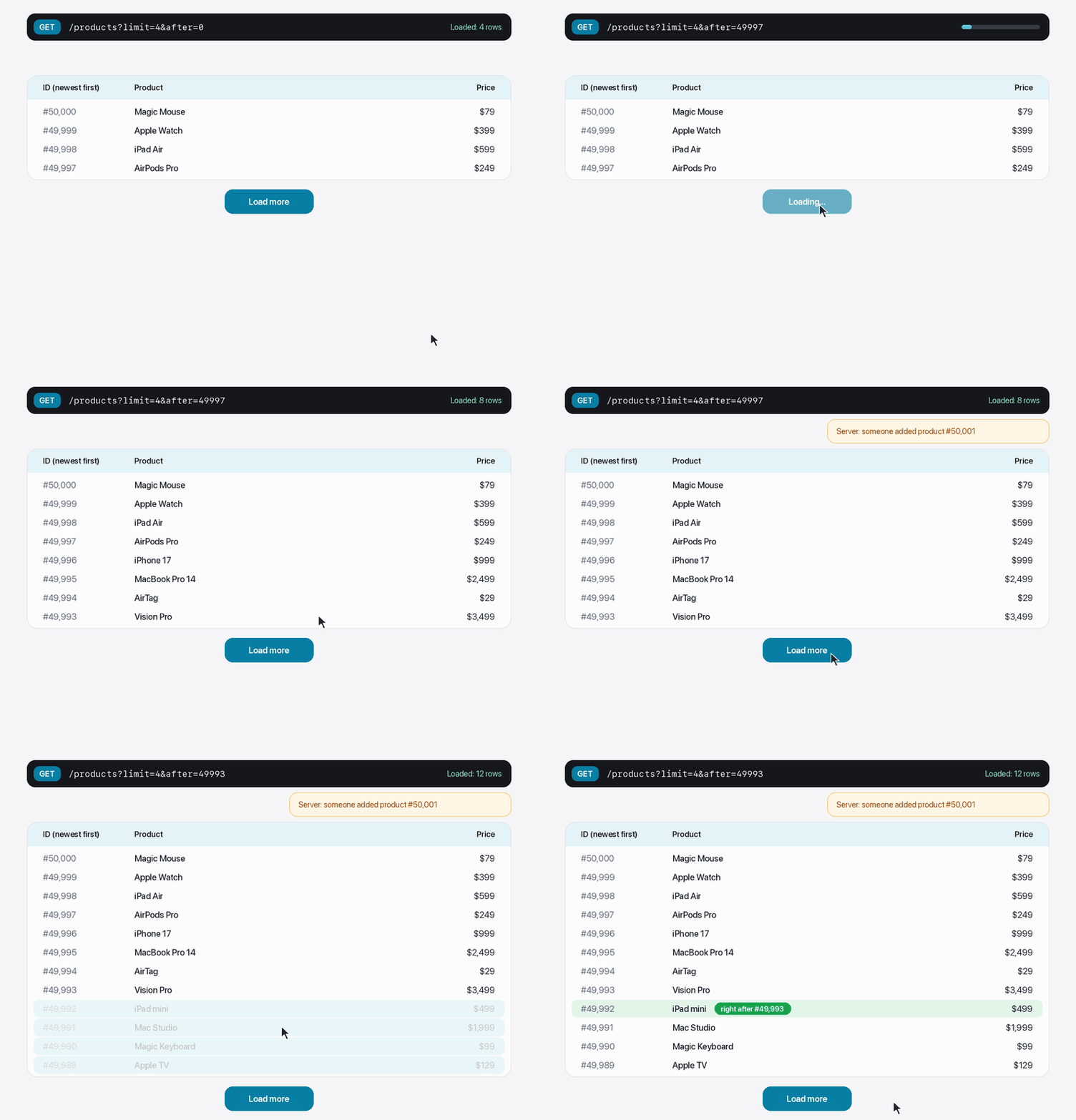
SELECT * FROM products WHERE id > 40 ORDER BY id LIMIT 20;Here the main difference is WHERE id > 40 instead of OFFSET 40. The database uses the index and goes directly to the right row, so page 2,000 is as fast as page 1. And if somebody adds or deletes a product, the next page still starts right after the last row the user saw. No duplicates, no skipped rows.
Here is the same Load more example from the offset section, but with a cursor. To keep it readable, the cursor is the plain id instead of an encoded value. The list is sorted by newest first, so after=49993 means WHERE id < 49993. Even after a new product is added, the next rows start right after the last row the user saw:
The price is flexibility. With a cursor, we can only go to the next (or previous) page. We can't jump to page 57, and usually we don't know the total number of pages. Also the cursor depends on the sort order. If the user sorts by price, the cursor should contain the price and the id together, because many products can have the same price.
There is also page pagination, GET /products?page=3&limit=20. It's the same as offset under the hood: the server calculates offset = (page - 1) * limit. The only difference is that the client works with page numbers instead of rows, so it can't start from a random row.
| When | Page | Offset | Cursor |
|---|---|---|---|
| The user needs page numbers | yes | yes | no |
| The user needs to jump to any page | yes | yes | no |
| The user changes page size while browsing | no | yes | yes |
| The dataset is very large | no | no | yes |
| Data changes often (feeds, logs, chat) | no | no | yes |
| Infinite scroll | no | no | yes |
| Simplicity matters more than speed | yes | yes | no |
Which one to choose?
Virtualization and pagination solve different parts of the problem. Virtualization reduces the DOM, pagination reduces the network. That's why the choice mostly depends on how the user works with the data:
| When | Virtualization | Pagination |
|---|---|---|
| The user scrolls and scans the data | yes | no |
| The user needs to find a specific page/row | no | yes |
| The full dataset is small enough to download | yes | no |
| The dataset is huge or grows all the time | no | yes |
| Backend API can't be changed | yes | no |
| The user shares or bookmarks a position | no | yes |
Using them together
In real applications, the best answer is often both. Infinite scroll is a good example: the user scrolls one long list, but under the hood the data comes page by page with cursor pagination, and only the visible rows are rendered with virtualization.
const { data, fetchNextPage, hasNextPage, isFetchingNextPage } =
  useInfiniteQuery({
    queryKey: ["products"],
    queryFn: ({ pageParam }) => fetchProducts({ after: pageParam, limit: 50 }),
    initialPageParam: undefined as string | undefined,
    getNextPageParam: (lastPage) => lastPage.nextCursor ?? undefined,
  });

const products = data?.pages.flatMap((page) => page.items) ?? [];

const virtualizer = useVirtualizer({
  count: products.length,
  getScrollElement: () => parentRef.current,
  estimateSize: () => 48,
});

const virtualItems = virtualizer.getVirtualItems();
const lastItem = virtualItems[virtualItems.length - 1];

useEffect(() => {
  // The user reached the end of loaded rows, so load the next page
  if (
    lastItem &&
    lastItem.index >= products.length - 1 &&
    hasNextPage &&
    !isFetchingNextPage
  ) {
    fetchNextPage();
  }
}, [lastItem, products.length, hasNextPage, isFetchingNextPage, fetchNextPage]);
Pagination solves the network issue, because we load only 50 rows at a time. Virtualization solves the DOM and memory issues, because even after the user loads 5,000 rows, only around 30 of them are in the DOM. All 3 issues from the beginning of the article are solved together.