How a Web Page Loads HTML, CSS, and JS Content
HTML document is the first thing the browser needs before anything can be shown. It sends a request to the server, and the server responds with an HTML file. This file is the skeleton of everything. Without it, there's nothing to parse, style, or render. Every other resource (CSS, JavaScript, images, fonts) is discovered through this HTML, so it has to arrive first.
Once the HTML starts arriving, the browser doesn't wait for the whole file and it begins parsing immediately, streaming through the markup from top to bottom, converting tags into a tree of nodes called the DOM (Document Object Model).
This top-to-bottom order matters a lot. The position of a <link> or <script> tag in the document directly affects when and how the browser handles it.
Hitting a <link rel="stylesheet">
When the parser encounters a CSS file, it doesn't stop building the DOM. CSS doesn't block HTML parsing.
CSS file only blocks rendering. The browser won't paint anything to the screen until it knows the styles, because painting unstyled content and then restyling it would cause an ugly flash and wasted work. The CSS file is fetched, parsed into the CSSOM (CSS Object Model), and once both the DOM and CSSOM are ready, they combine into the render tree.
CSS doesn’t block the HTML parser, but it does block rendering.
Hitting a <script> Tag
There are 2 pathways here:
- Inline
<script>: already in the HTML, no network request needed. - External
<script src="...">: the browser has to fetch it.
Script tags block the HTML parser by default. The browser's HTML parser reads your page top to bottom, building the DOM as it goes. When it hits a <script> tag with no attributes, it has to:
- Stop parsing HTML.
- Fetch the script (if external).
- Run the JS engine on it, fully, top to bottom.
- Only then resume parsing the rest of the HTML.
Always put your <script> tags at the bottom of <body> — it's classic advice everyone has heard at least once. Let the page's visible content parse first; otherwise, all content will be blocked.
Plain <script>: blocks HTML parsing entirely while it fetches and runs.

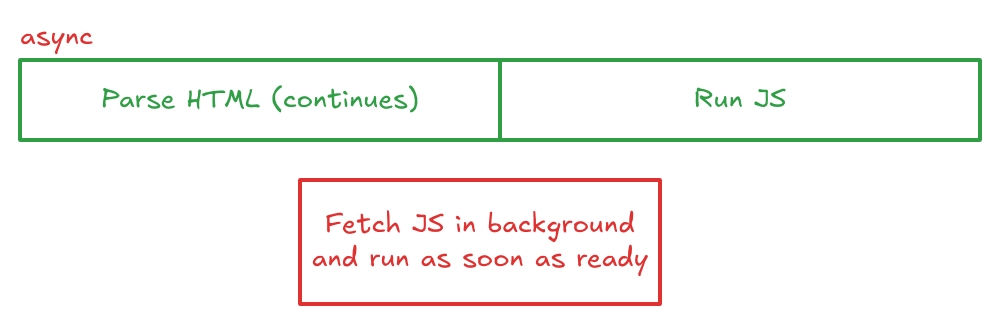
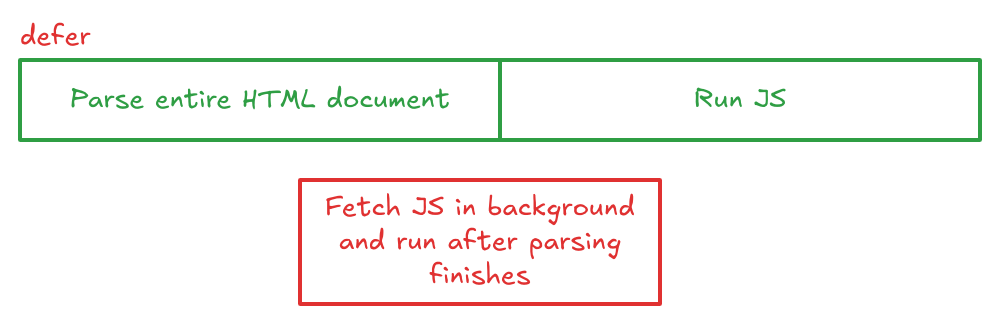
async and defer exist specifically to avoid this blocking.
async fetches in parallel with HTML parsing, but runs the moment it's ready. It pauses parsing whenever that happens, in whatever order scripts finish downloading.
defer fetches in parallel too, but always waits until the HTML document is fully parsed, and runs multiple deferred scripts in their original order.
Once the DOM (structure) and CSSOM (styles) both exist, the browser merges them into the render tree.
The browser then calculates the exact size and position of every visible element on the page, which is called layout or reflow. It figures out, in pixels, where the box for each element sits relative to the viewport and its neighbors.
After layout (reflow) but before painting, the browser runs "layout effects" like React's
useLayoutEffect. This lets you measure or change the DOM right before anything is shown to the user.
With the positioning and any layout effects settled, the browser proceeds to the paint phase by filling in all the pixels: text, colors, borders, shadows, and images.
After the browser paints the screen, React runs
useEffect. This is good for things like data fetching or logging, since it happens after the user already sees the changes.